
Holiday Mailroom Rush? Here's How to Handle More Mail Without More Manual Work
November 18, 2026

The holidays can get pretty busy for coworking spaces and Virtual Office operators. With more packages arriving, members traveling, and staff taking time off, keeping the mailroom running smoothly can become a challenge.
It is not just the increase in deliveries. Every piece of mail still needs to be processed: identifying recipients, assigning mailboxes, notifying members, and handling scanning, forwarding, or pickup requests. These tasks are manageable on a normal day, but during the holiday rush, they can quickly turn into a growing backlog.
The good news? Handling more mail doesn’t necessarily have to mean more work for your team.
A few improvements to your processes, along with the right automation, can make a big difference.
Here’s where to start.
1. Find Out What's Slowing Your Mailroom Down
Think about the last time several deliveries arrived at once. How long did it take your team to process everything? Did someone have to manually identify each recipient, assign a mailbox, upload photos, and send notifications?
Now imagine doing that with twice as many deliveries and fewer people on your team. That’s when repetitive tasks really start to add up.
The first step is identifying which parts of your process take the most time and where automation could help.
With the PilotoMail Mailroom App + Auto-Assign, your team can upload and process incoming mail directly from a phone.
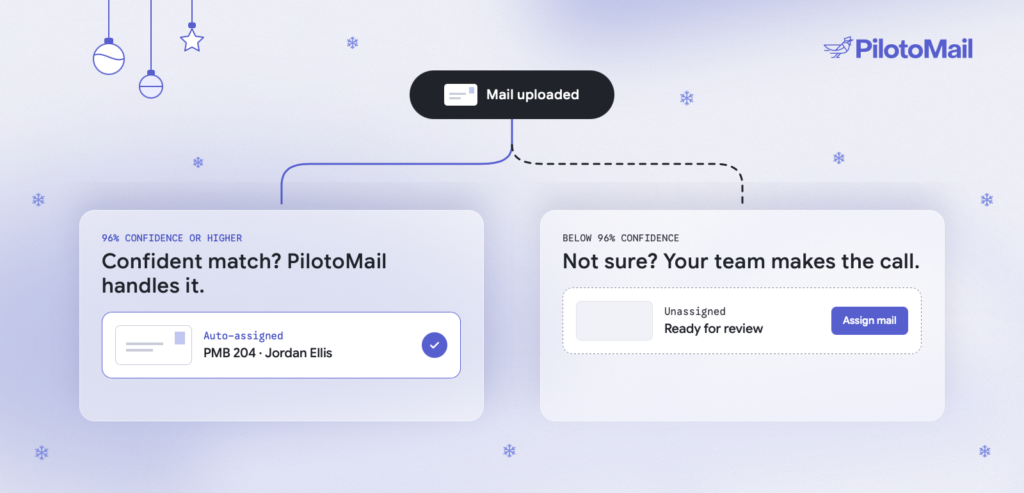
Instead of manually searching for every recipient, Auto-Assign identifies and assigns mail to the correct mailbox when there’s a confident match. When the system isn’t sure, the item stays in the Unassigned queue for your team to review. This helps reduce repetitive work so your team can focus on items that actually need attention.
Quick tip: Review your Unassigned queue daily. It’s easier to resolve a few items each day than deal with a backlog after the holidays.
2. Don't Let Packages Take Over Your Storage Space
We’ve all seen how quickly storage areas fill up when members travel or delay pickups. A few packages turn into crowded shelves, and suddenly finding one specific delivery takes much longer than it should.
Before the holiday rush:
- Review packages awaiting pickup and send members a friendly reminder.
- Clearly label shelves and storage areas.
- Separate items ready for pickup from those awaiting additional processing.
- Keep storage records updated so anyone on your team can locate an item.
It’s also worth reviewing your storage policies and making sure members understand any applicable fees.
The goal isn’t just to make room for more packages. It’s to make sure your team can find what they need without unnecessary searching.
3. Make Mail Management Easier for Traveling Members
The holidays may take your members away from their offices, but their mail keeps arriving. Some might need an important document scanned, while others may request forwarding or want to check whether a package has arrived.
Without a clear process, these requests can quickly turn into extra emails, phone calls, and follow-ups.
With PilotoMail’s virtual mailbox platform, members can view incoming mail and request available services, including scanning, forwarding, or pickup, through their online portal. They can stay informed wherever they are, while your team can manage requests through an organized workflow.
Before the holidays, remind members to check their mail, confirm forwarding addresses, and submit time-sensitive requests before your processing deadlines.
A little communication ahead of time can save everyone unnecessary back-and-forth later.
4. Keep Things Running with a Smaller Team
Holiday schedules can get complicated. Your usual mailroom manager might be away, or someone from the front desk may need to cover deliveries. That’s why having a consistent process is so important.
Make sure backup team members understand how to process incoming mail, locate stored packages, review pending requests, and handle items requiring additional attention.
Having mail records and service requests organized in one platform can make these handoffs easier.
After all, your mailroom shouldn’t come to a standstill just because the person who usually runs it is on vacation.
Don’t forget to communicate adjusted pickup hours, holiday closures, and processing deadlines to members in advance.
5. Prepare for the Post-Holiday Backlog
Even with good preparation, you might return from the holidays to extra deliveries and pending requests.
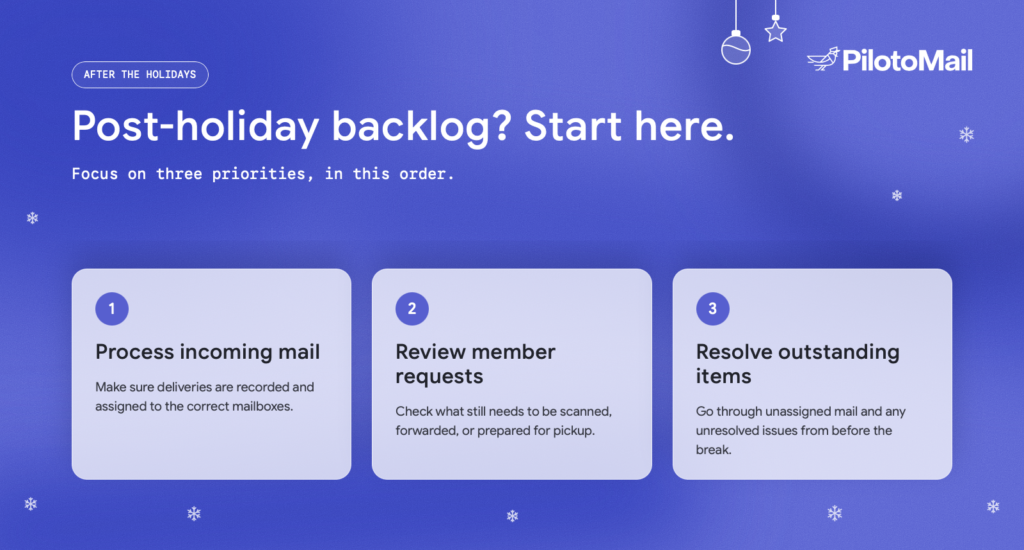
Rather than trying to tackle everything at once, focus on three priorities:
- Process incoming mail: Record and assign new deliveries.
- Review member requests: Check outstanding scanning, forwarding, and pickup services.
- Resolve pending items: Review unassigned mail and any unresolved issues from before the break.
If delays are expected, keep members informed. And once things settle down, take a moment to review what worked and what could be improved for the next busy period.
Your Holiday Mailroom Checklist
Before the rush begins, make sure your team is ready for increased deliveries, changing schedules, and pending requests.
We’ve created a simple checklist to help you prepare and keep your mailroom organized.
View Your Holiday Mailroom Checklist

Save it, share it with your team, and keep it handy throughout the holiday season.
More Mail Doesn't Have to Mean More Manual Work
The holiday rush might be temporary, but the challenges it brings matter year-round.
As your Virtual Office business grows, so does the amount of mail your team needs to handle. And if every additional mailbox means more manual work, that growth can become difficult to manage.
That’s why having the right systems in place matters.
At PilotoMail, we’re helping operators simplify incoming mail processing, reduce repetitive tasks, and organize member requests with our Mailroom App, Auto-Assign, and virtual mailbox management platform. Whether you’re preparing for the holiday rush or planning to grow your Virtual Office business, it’s worth asking:
Could your mailroom handle twice the volume without twice the work?
Book a demo and see how PilotoMail can simplify your mailroom operations.